
RAMCHECK LX DDR2/1
RAMCHECK LX DDR2
RAMCHECK LX DDR1
RAMCHECK LX Base Tester
Optional Adapters
240-pin DDR2
200-pin DDR2 SO-DIMM adapter
200-pin DDR2 SO-DIMM converter
184-pin DDR Pro
200-pin DDR SO-DIMM converter
100-pin DDR SODIMM
DIMMCHECK 168
66-pin DDR Chip
DDR2 MiniDIMM
144-pin SO-DIMM
100-pin SO-DIMM
SDRAM Chip
200-pin Sun DIMM
50-pin EDO TSOP
EDO/FPM SOJ
72-pin SODIMM
30/72-pin SIMM
PC Communication Software
Product FAQ
RAMCHECK Testers
SIMCHECK II Line
SIMCHECK II LT PLUS
Refurbished LT PLUS
SIMCHECK II Adapters
Which System Is For Me?
Why Buy From Us?
Why Test Memory?
Int'l Distributors
How to Purchase
Tech Support
Service & Upgrades
Manuals
Software Downloads
FAQ
Site Map
Home
Contact us at
(281) 879-6226
sales@innoventions.com
RAMCHECK/RAMCHECK LX Calibration & Hardware Upgrades
Document updated 11-21-17
While most improvements to our products are available to our customers via the Internet through firmware and software upgrades, the continuous changes in memory technology require us to make various hardware and component changes in our products.
We strongly recommend that you have your unit serviced every 12-18 months to make sure that it remains current to factory production specifications and operates at its most optimum level, thereby protecting your investment and ensuring that your test system does not become obsolete.
Additionally, we offer special hardware upgrades soon after we incorporate them in our current production. For example, our most popular special hardware upgrade is currently the required support for DDR2. This document outlines the RAMCHECK Calibration & Upgrade procedure, and will enable you to determine if your RAMCHECK requires an upgrade. It is applicable to both the RAMCHECK and RAMCHECK LX models.
Overview of the Factory Calibration & Upgrade Procedure
You should send in your RAMCHECK/RAMCHECK LX for the Calibration and Upgrade procedure either at regular intervals (every 12-18 months) or upon the emergence of a new test feature that requires a special hardware upgrade. Special upgrades may be recommended to you by our Technical Support department or may be indicated elsewhere on our web site. In any event, please remember to contact us to obtain an RMA number as we cannot accept packages without valid RMA numbers.
Once in the factory, our technicians will inspect all Printed Circuit Boards (PCB) assemblies to identify their revision number. Some old PCB versions cannot be upgraded due to the timing characteristics of those boards' trace layout. Such boards will be completely replaced with new boards; original test sockets and other removable hardware will then be transferred from your original old board. Other PCB assemblies of your unit will be upgraded to current production specification by placing and replacing different components. The unit will go through a 24-hour burn-in process followed by the final Calibration process. This process involves the same final testing and calibration that we perform on every new production unit. After all factory tests have been concluded with a positive result, the unit is returned with the relevant Calibration certificate.
Determining the Need for the Upgrade Procedure
If you elect to perform the periodic Calibration and Upgrade every 12-18 months, you should use the Calibration Date stored in your unit (see below) to determine when to send the unit.
As a registered user, our Technical Support department may notify you when a new feature that requires a special upgrade is available. In some cases, you can determine that you may need a special upgrade if a certain new feature does not work properly on your unit.
To help determine if your unit requires calibration & upgrading, first verify that you have the latest firmware revision (RAMCHECK LX version 3.31/RAMCHECK version 2.64 or higher) by checking our Firmware Download page. If you have a DDR adapter, make sure it is inserted on RAMCHECK and enter the following key sequence during Standby Mode:
| Press F2 | Enters Setup Mode |
| Press F5 | For Next |
| Press F3 | Opens ProdInfo (Product Information) window |
You will reach a multi-page Product Information screen which you can scroll up and down using the F3 and F4 buttons. The following table lists the current product information variables for RAMCHECK/RAMCHECK LX:
| Variable | Value | Comments |
| RAMCHECK LX Firmware Version | 3.10 | or higher. |
| RAMCHECK LX Date | 6/18/10 | or later. |
| RAMCHECK Firmware Version | 2.43 | or higher. |
| RAMCHECK Date | 5/14/10 | or later. |
| RAMCHECK LX Kernel Version | 2 | or later. Kernel version is controlled by the firmware download process which is performed via the Internet. |
| RAMCHECK Kernel Version | 7 | or later. Kernel version is controlled by the firmware download process which is performed via the Internet. |
| Hardware Version | 2.00 | or later. |
| Alt. Parts | xx | These two hexadecimal digits encode the use of alternate parts or indicate minor upgrades on the RAMCHECK's processor board. |
| PAL Code | xxxxxx | Six hexadecimal digits encoding various levels of RAMCHECK internal PAL chips. |
| Adapter Code | xx_xx or xx | This 2 or 4 digits code indicates the hardware level of an adapter (like the DDR or DDR2 adapters). If no adapter is installed, the number should be "40". If a DDR2 adapter is installed, you must have adapter code of "C0_01" or higher. If a DDR PRO adapter is installed (e.g. RAMCHECK PLUS PRO configuration), you must have an adapter code of "A0_03". Older DDR adapter must have adapter code of "90_34" or "90_33". |
| DDR2 Ready | OK 866 or xxxxxx | Must show "OK 866" for DDR2 adapters. If the RAMCHECK base tester needs an upgrade, a 6-digit code will appear. |
| DDR Ready | OK 466 or OK 333 or xxxxxx | Must show "OK 466" for DDR PRO adapters. Older DDR adapter must show "OK 333" in order to support the DDR adapter at 333MHz. A 6-digit code indicates that a factory upgrade is required. |
| DDR/DDR2 Upgrade | Optional Message |
If the installed DDR2 or DDR adapter is not fully updated, you will see a message like "UPGRADE NEEDED!" or "UPGRADE RECOMMENDED". More details below. |
| MFG Date | mm/dd/yyyy | RAMCHECK manufacture date. |
| CAL Date | mm/dd/yyyy | Last Calibration Date. |
| CMP CL2 | xxxxxxxx | Various Calibration Data |
| CAL VOLT at | xxx | Various Voltage calibration data, provided in three lines |
| SD Max Clock | xxxMhz | Maximum RAMCHECK base tester clock for OLDER SDRAM devices. Typically 180-200MHz. (Note: This number has no bearing for DDR or DDR2 maximum frequencies) |
| MAX CAS and RAS frequencies | xxxMHz | Various SDRAM calibration data. (Note: This number has no bearing for DDR or DDR2 maximum frequencies) |
| RCB Ver | xxxx | 4 digit code for RAMCHECK's top board level |
The actual variables and their order in this table may be changed as we develop new firmware versions. Again, please note that you must have the latest firmware for the following screen examples. Many items in the above information are for reference only. To determine the need for Calibration and Upgrade, you should use the following variables and examples.
- CAL DATE=The calibration date is updated every time you send the unit for calibration. First two digits indicate the Month, next two indicate the Day, and the last four digits show the year. We recommend that you send your unit for calibration every 12-18 months.
- When the DDR2 adapter is mounted on the
RAMCHECK base tester, DDR2 READY=must show "OK 866" for DDR2
as in the following screen.
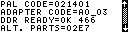
. - When the DDR PRO adapter is mounted on
the RAMCHECK base tester, DDR READY=must show "OK 466" as in
the following screen.
. - If you have the older DDR (p/n INN-8668-6) unit,
DDR READY=must show "OK 333" as
shown in the following screen.
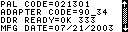
Please note that the MFG DATE follows the DDR READY line in the above example without any upgrade message. This is your optimal status for 333MHz testing. - If DDR2 READY or DDR READY produces a six
digit code is shown as in the following screen, you must send your unit for
factory upgrade.
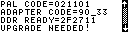
This code indicates that the RAMCHECK base tester cannot support the DDR or DDR2 adapters without the factory upgrade. - ALT PARTS=This code determines minor upgrades or alternative parts used in the RAMCHECK's lower board and may be required by our Technical Support department. For 333MHz DDR, values of "21" or "23" should be OK. If you have another value, the unit requires an upgrade, although minor upgrades can be deferred to the periodic calibration and upgrade process.
PRODUCT INFORMATION DATA (filled-in by customer)
| Variable | Value Shown |
| ALT PARTS | |
| PAL CODE | |
| ADAPTER CODE | |
| DDR/DDR2 READY | |
| CAL DATE | |
| RCB VER |
Using the above information, our Technical Support department can determine if you need to upgrade your RAMCHECK, RAMCHECK and the DDR/DDR2 adapter, or just the DDR adapter, and to determine the fixed cost of the service.
Ordering the Calibration and Upgrade Procedure
Please contact our Technical Support department for pricing and to schedule this service. The service part number for ordering is INN-8668P-C-U1.